Spaces
Up to nine Spaces per window, each with its own name and icon. ⌘1 to ⌘9 switch Spaces, ⌥1 to ⌥9 pick tabs, and ⌥⌘← and ⌥⌘→ step through Spaces.
Satori features
Satori is a small browser for Mac with Spaces, Split View, Focus, Soundscapes, web apps, and Bitwarden support. Each part stays out of your way until you need it.
Up to nine Spaces per window, each with its own name and icon. ⌘1 to ⌘9 switch Spaces, ⌥1 to ⌥9 pick tabs, and ⌥⌘← and ⌥⌘→ step through Spaces.
The top bar and sidebar take on each site's color and remember it. The window behind the page matches.
Choose the tab position in Settings › Tabs, or press ⇧⌘S. Pinned tabs keep their place.
Drag a tab onto another tab or onto the page, or give Split View a shortcut in Settings › Shortcuts. A divider sets the width.
Type part of a tab's name to switch to it, across every Space. Press ⌘K to start. ⌃Tab steps through the row or through recent tabs.

A link from another app opens in a small Kensho window first, with the address at the top. Press Open in Satori (⌘O) to keep the page. ⌥⌘N opens an empty Kensho window from any app, and ⌘F finds text on its page. Turn it off in Settings › General.
A video playing with sound floats on its own when you leave its tab (off in Settings › Tabs), or when you press ⇧⌘P. Click a tab's speaker to mute it, or choose Mute from its menu to keep a whole site silent.
Open another window for another task, each with its own tabs and Spaces (⌘N). Quit and reopen, and every window comes back. File › Reopen Closed Window returns the last one you closed.
The tabs and the bar step aside, and the page has the window to itself. Point at the edge to bring them back. Press ⌃⌘S to turn it on.
Nine sounds, from Focus to Nature, plus binaural tones. They fade out when a tab plays sound.
Satori finds the article on the page and sets it in the theme and text size you like, with nothing around it. Press ⇧⌘R on the page.
Hide a banner, a sidebar, or any other clutter on a page. It stays hidden on that site. Press ⇧⌘H, then point at it.
In Reading mode, Satori writes a short summary of a long article, in its language or yours. Apple Intelligence writes it on your Mac.
Needs macOS 26 and Apple Intelligence.

What you do in Satori is never studied, sold or used to train AI. There is no profile of you on a server to build it from.
Shield is part of Satori, not an extension. It stops ads and trackers at the network level, before they reach the page. You can turn it off for a site.
Satori answers cookie banners with no, or with only what the site needs, and the page opens without them.
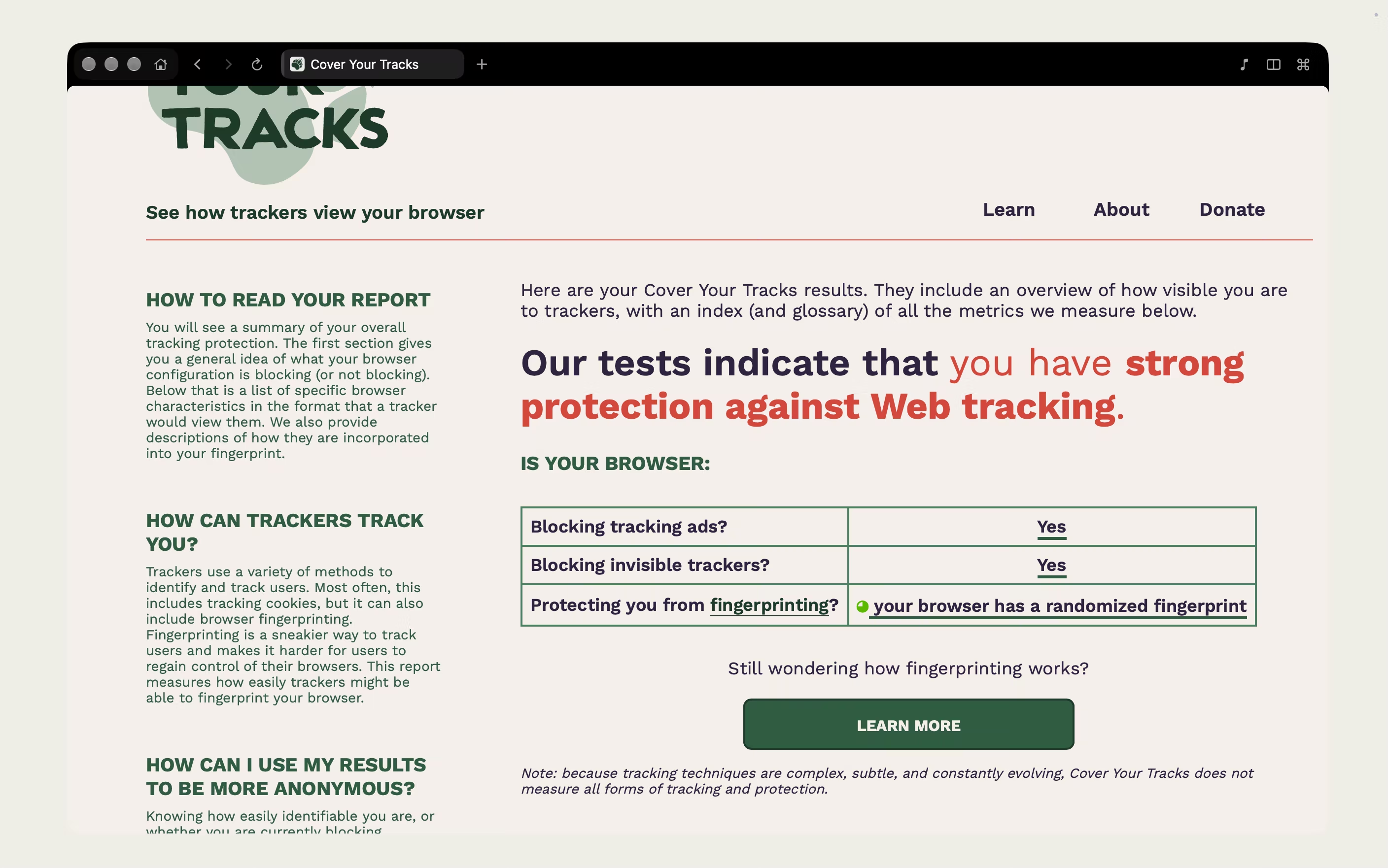
Copy Address strips tracking tags from the links you share. On the EFF's Cover Your Tracks test, Satori blocks tracking ads and invisible trackers.
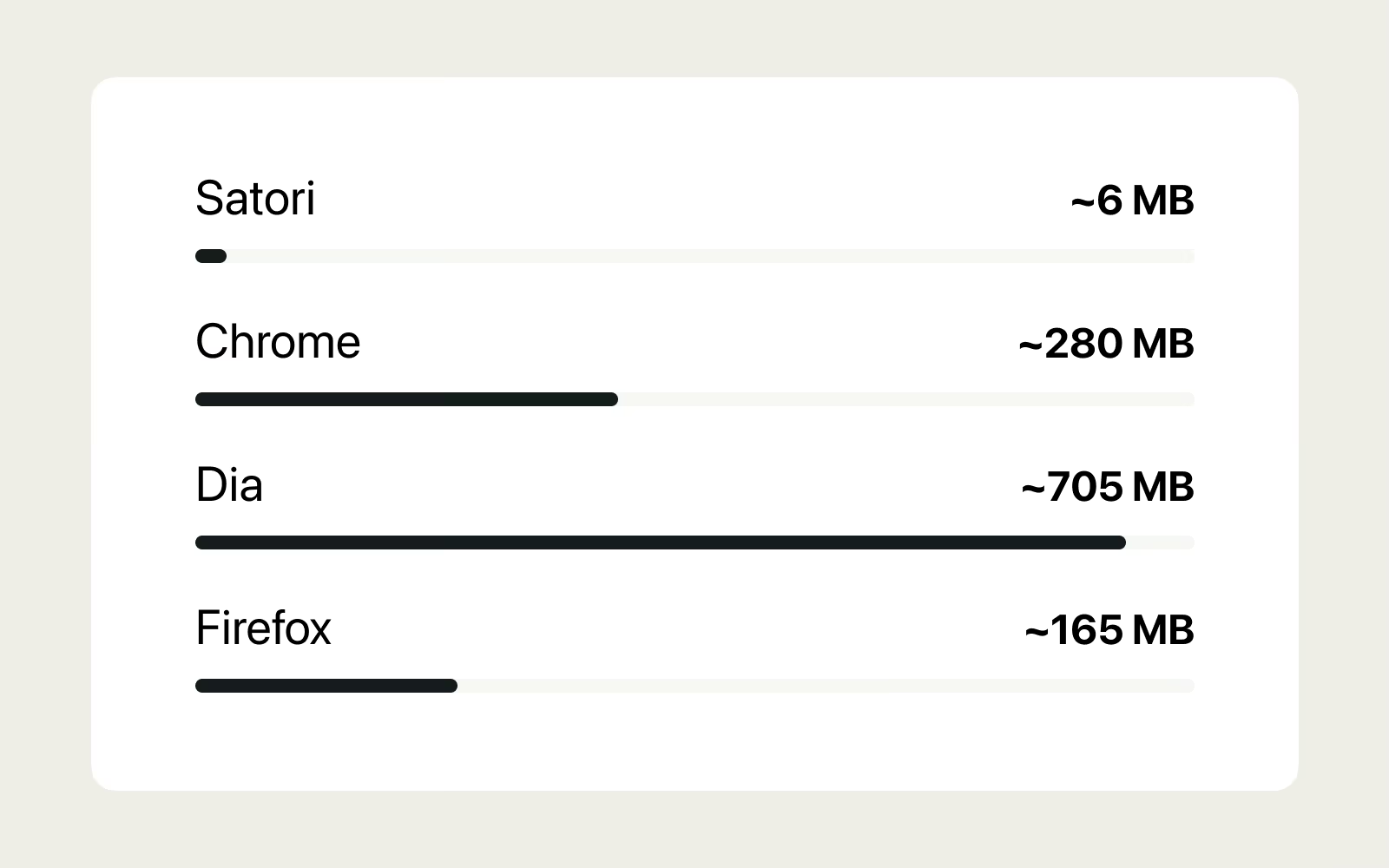
Satori.dmg is about 6 MB. Less code means a faster browser.
Hidden tabs slow down, and idle ones sleep after half an hour.
Point at a link and Satori opens a connection to the site ahead of time, without loading the page.
Satori reads articles aloud, paragraph by paragraph, in the system voice or a natural one.
A natural voice downloads once, 135 MB, when you pick it.
Translate a page on your Mac with Apple's translator. Press ⇧⌘Y, or right-click the globe button to choose the language for a site.
Right-click a video and choose Save Video. A video that streams in pieces is joined into one file. When the page offers several qualities, you pick one.
Videos protected with DRM, live streams and videos on a local network are refused, with a message that says why.
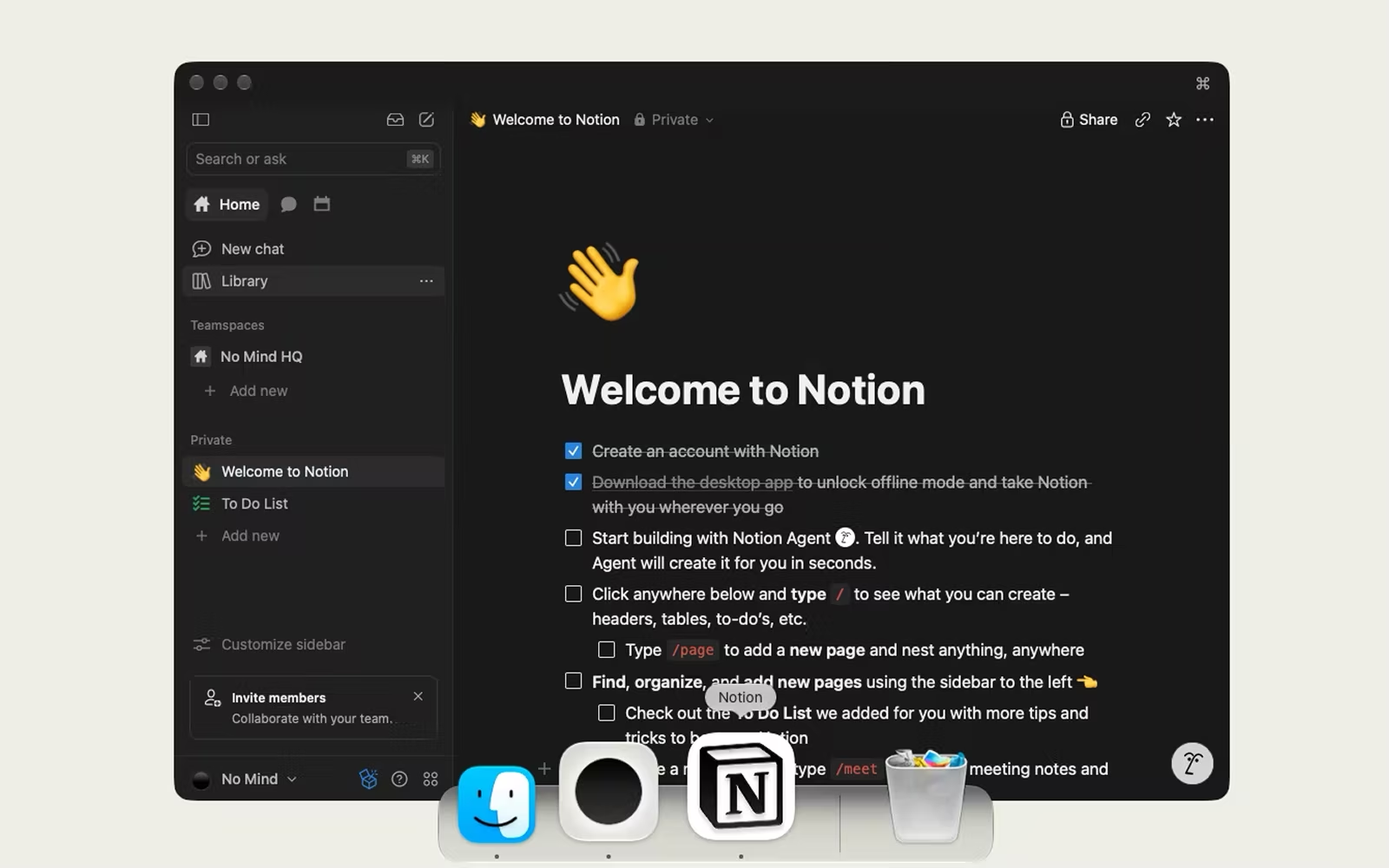
Keep a site you use every day in the Dock as its own app, with a simple toolbar and settings of its own.
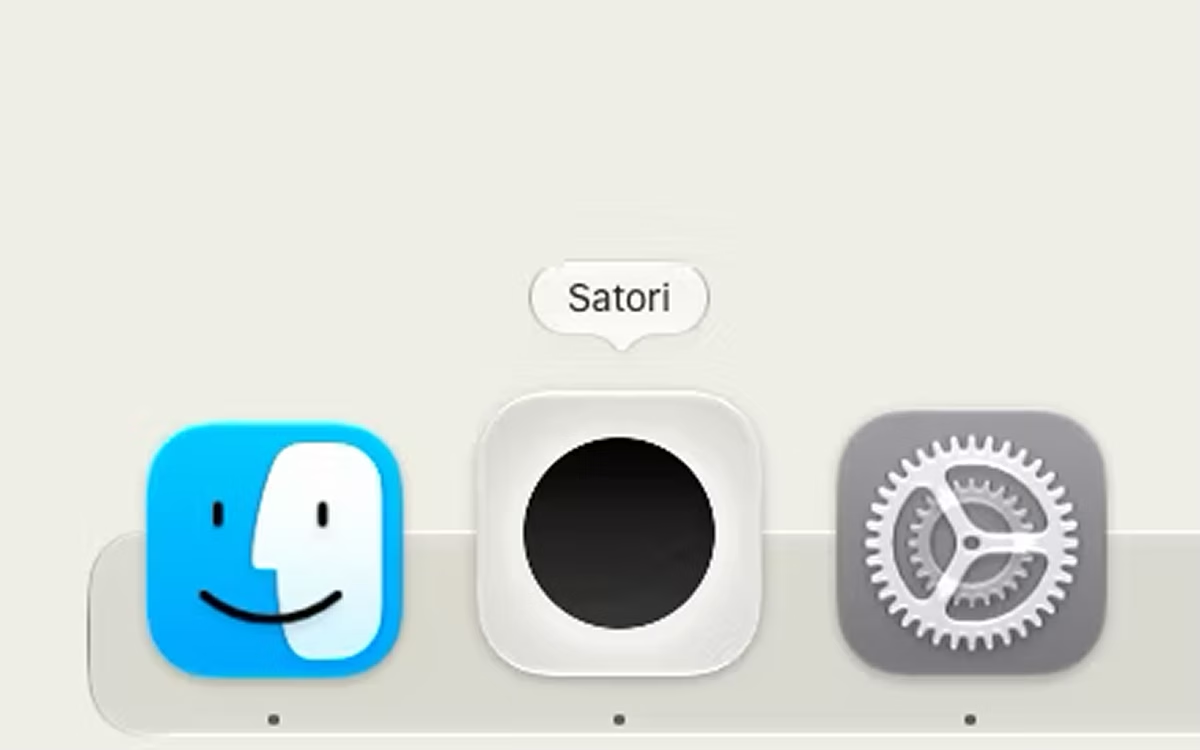
Put any picture in the Dock and the app switcher, one for the light look and one for the dark. Choose them in Settings › Appearance.
Click the tab you're on, or the empty strip beside the tabs, and the page scrolls back to its top.
Chrome extensions are switched off for now. Bitwarden works, on macOS 15.4 or later.
Satori will bring other extensions back one at a time, as each is known to work. Bitwarden reaches only what its manifest asks for, and an update that adds permissions or sites asks again.
| Claim |  | Chrome |
|---|---|---|
| Works without an account | There is no account | Signing in is optional |
| Syncs bookmarks and passwords to an account | No sync and no iCloud | After you sign in with a Google Account |
| Blocks ads by default | Ads and trackers, on every site. You can turn it off per site | Intrusive ads, on sites with poor ad experiences |
| Engine that draws web pages | WebKit, the engine Safari uses | Blink |
| Puts idle tabs to sleep | After half an hour, or four hours with paused media. Settings has a switch for it | Memory Saver, a setting that deactivates tabs you are not using |
| Shows tabs in a vertical sidebar | View › Tabs in Sidebar (⇧⌘S) | Show Tabs Vertically, rolling out since April 2026 |
| Runs Chrome extensions | Switched off for now. Bitwarden works, on macOS 15.4 or later | From the Chrome Web Store, on Manifest V3, the latest extensions platform |
Sources: Chrome Help (support.google.com/chrome), WebKit (webkit.org), Chromium (chromium.org), Google blog (blog.google), Chrome for Developers (developer.chrome.com). Checked on October 19, 2026. Chrome details change with Chrome versions, regions, and settings. Satori and Chrome are compared by documented features, not by speed.
Simplicity covers the address field and the Welcome. If data matters most to you, start with Privacy.
Satori covers tabs, windows, Spaces, bookmarks, history, downloads, printing, and a Develop menu. The features pages list what each part does.
Yes. Satori needs macOS 15 or later on an Apple Silicon Mac. There is no Intel build.
On the Release notes page. Every version from 0.8.0 to 0.13.7 is listed, newest first.
No. There is no sign-in, no sync, and no telemetry. Your history, tabs, and bookmarks are stored in files on your Mac.
The pages you ask for, their icons, and update checks. Update checks run about five seconds after launch, then once a day. Two more things happen before you press Return. On a blank tab, Satori starts loading the page it suggests from your history. If you type a single word Satori doesn't recognize, it checks whether that word is a .com address. Search words are not sent before Return. The full list is on the Privacy page.
Yes, from Chrome, Arc, Dia, Brave, Edge, Opera, and other Chromium browsers. Import passwords from Passwords, and bookmarks from the bookmarks window. Choose your browser, and macOS asks once for permission to read its keychain entry for passwords. Satori does not import from Safari directly. Bookmarks from Safari, Firefox, or any other browser come in as an HTML file through Import from File…, and passwords can come in from a CSV file.
Not for now. Chrome extensions are switched off. Bitwarden works, on macOS 15.4 or later, and other extensions will return one at a time, as each is known to work.
Open the help centerSee what leaves your MacSee more questions
Open the disk image, drag Satori into Applications, and launch it.
Download Satori for MacSend to my Mac
Free. Requires macOS 15 or later on an Apple Silicon Mac.